Contents
- Introduction
- Hardware
- Software Version List
- How to Startup
- Event Information
- Leaflet
- Tips
- Known Issues & Restrictions
- Support
Introduction
This is the page for Sparrow Hawk board with R-Car V4H provided Retronix Technology Inc.
Hardware
Information
| Board Name | Kit | R-Car V4h SoC version | SoC Information | Board Information | Where to Buy |
|---|---|---|---|---|---|
| Sparrow Hawk (DDR8GB/16GB) |
Complete/Basic | v3.0 | R-Car V4H | Sparrow Hawk provided by Retronix Technology Inc. |
Shimafuji |
Picture
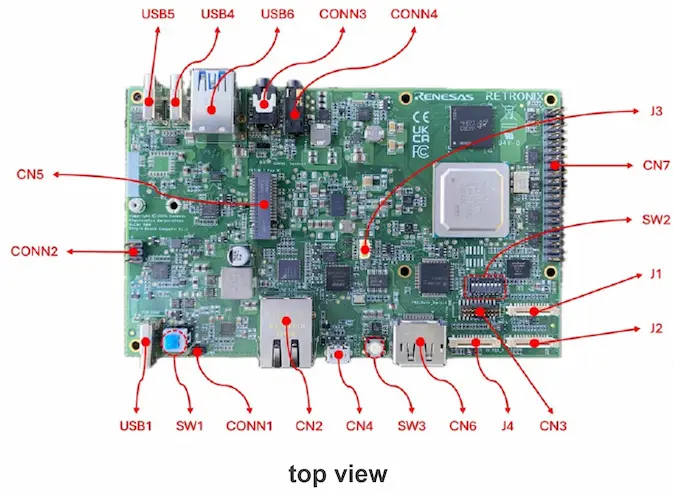
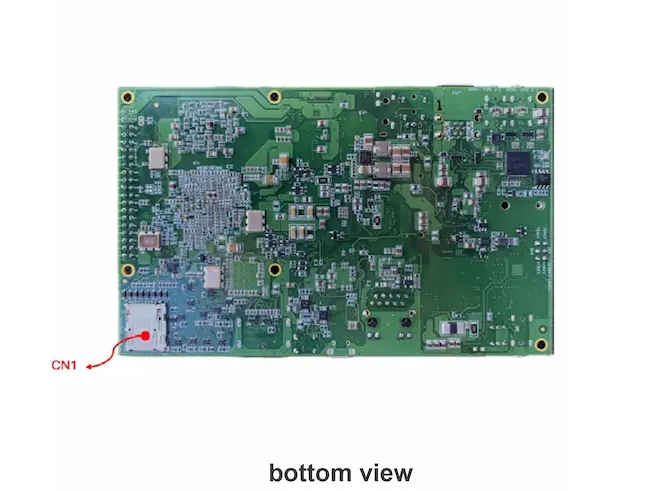
Features
| Function | Interface | Specification |
|---|---|---|
| CPU | - | 4x Arm® Cortex®-A76, 3x Arm® Cortex®-R52 |
| GPU | - | AXM-8-256 |
| DRAM | - | 8GB/16GB LPDDR5 |
| Flash Memory | - | 64MB QSPI |
| Camera I/F | J1, J2 | 2x Raspberry Pi Camera |
| Display | CN6, J4 | 1x DP, 1x DSI |
| Ethernet AVB | CN2 | 1 Port (1Gbps) |
| Debug Serial | CN4 | 2 Port |
| Audio | CONN3, CONN4 | In/Out, In |
| PCIe4.0 | CN5 | 1x M.2 Key-M (x2 lane) |
| USB3.0 | USB4, USB5, USB6 | 2x USB type-A, 2x USB type-C |
| CAN-FD | CONN2 | 2 Port |
| PWM | J3 | 1 Port |
| JTAG | CN3 | 1 Port |
| Removal Media | CN1 | 1x MicroSD |
| Extensions | CN7 | Raspberry Pi 40-Pin CN |
| Mode Switches | SW2 | Dip SW |
| Power | USB1(Input) | USB PD 20V |
| Power Control | SW1, SW3, CONN1 | 2x SW, 1x Jumper |
Switches Assignment
Boot mode
| SW2-1 | SW2-2 | SW2-3 | Description |
|---|---|---|---|
| ON | ON | ON | Serial Flash boot at single read 40MHz using DMA |
| OFF | OFF | OFF | SCIF/HSCIF download mode |
Other switch
| SW2-4 | SW2-5 | SW2-6 | SW2-7 | SW2-8 | Description |
|---|---|---|---|---|---|
| OFF | ON | ON | ON | ON | Initial setting |
Note: For more detail, please refer to board User’s Manual.
Debug Serial
This board has two serial devices and ChA(HSCIF0) is used for mainly.
| Channel | Baudrate | Format | Flow Control |
|---|---|---|---|
| ChA(HSCIF0) ex) COM<lower num>, /dev/ttyUSB<lower num> |
921600 bps | 8N1 | none |
| ChB(HSCIF1) ex) COM<higher num>, /dev/ttyUSB<higher num> |
115200 bps | 8N1 | none |
Caution
FAN must be installed. Do not remove FAN for cooling the R-Car V4H from the board, as doing so will lead to the R-Car V4H being overheated to destruction. It is recommended to use a heat sink and FAN together.
Software Version List
| Software | Version |
|---|---|
| Yocto Project | 5.0.15 |
| Debian | 13 |
| Linux kernel | 6.12.66 |
| U-Boot | 2026.01 |
| Arm Trusted Firmware | 2.14.0 |
How to Startup
| BSP |
|---|
| Yocto BSP |
| Debian based BSP |
Event Information
Please see here for information on Sparrow Hawk’s past and upcoming events.
Leaflet
- Sparrow Hawk Leaflet (2026/02/27)
- Benefits for Sparrow Hawk
- Hardware spec
- Support software version
- Board variants
- Website links(Sparrow Hawk Official website, Retronix website, Where to buy(Shimafuji))
Tips
- There is no output on serial console when power on the board.
- You can check following list to confirm board is broken or not.
- Do you write the loaders into the board?
- Do you change DIP-SW as correct settings?
- Do you use correct serial device? This board has two serial devices and lower number is used for mainly.
- Do you use correct USB-PD power supply? This board needs 20V3.25A(65W) output at least.
- You can check following list to confirm board is broken or not.
- How to use HDMI display instead of DP display.
- This board doesn’t support passive adaptor so that please use active adaptor.
- Why my Headset Mic is not working?
- There are two types of 4pin Headset. one is CIST which is default of sparrow-hawk. the other is MIST. The only deference is pin assign of MIC and GND. If you use MIST type of headset, please modify the board as follows:
- Mount :R631 , R632
- Unmount :R630 , R633
- There are two types of 4pin Headset. one is CIST which is default of sparrow-hawk. the other is MIST. The only deference is pin assign of MIC and GND. If you use MIST type of headset, please modify the board as follows:
- Loader recovery procedure
- If flashing fails and U-Boot no longer boots, please try the recovery procedure.
- Download ipl-burning.zip and unzip ipl-burning.zip. Then, run script in ipl-burning directory(Linux: run.sh, Windows: run.bat). If using Linux host PC, please install python3 and pip command on your system before running the script and close other console which uses serial port of the board before executing the script.
- Turn off the power and change SW2 according to the console instructions.
- Press Enter to continue.
- Turn on the power.
- Wait for the writing process to complete.
- Turn off the power and change SW2 again according to the console instructions.
- Press Enter to close the program.
- Note:
- This script use serial device /dev/ttyUSB* in Linux. But, it cannot be accessed from user without previledged right by default settings. Please use sudo command or add current user into dialout group.
- Note:
- Please change the Mode Switch(=SW2) according to the instructions displayed by the ipl-burning(run.sh or run.bat).
Known Issues & Restrictions
- USB Type-C port doesn’t support DP-alt mode so that Display output is not supported. Please use DisplayPort or Raspberry Pi touch Display 2 instead of type-c.
- FAN/Heat sink less doesn’t work well due to high temperature in some case. Please attach the Heatsink and FAN to use the board.
Support
FAQ: https://github.com/orgs/rcar-community/discussions/categories/faq
Q&A Forum: https://github.com/orgs/rcar-community/discussions/categories/q-a